
magicApp Calling & Messaging
MAGICJACK VOIP SERVICES, LLCCommunication
4.238.15K Reviews
- Version
- 5.3.19-9f6d56e
- Installs
- 10.00M
- Age Rating
- Everyone
Screenshots
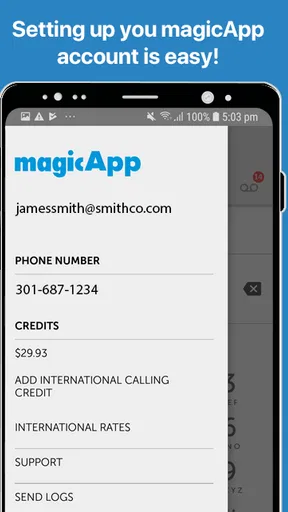


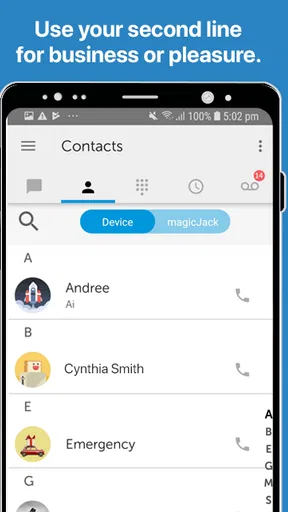
Our Review of magicApp Calling & Messaging
 Analysis by Appyee
I judge a calling app by the moments when I need it to be simple: checking a number, placing a call, or getting a message through when my usual mobile service is inconvenient. magicApp Calling & Messaging is a communication app from MAGICJACK VOIP SERVICES, LLC, built around using a magicJack number on a mobile device. It can be useful if you want that number within reach, but it works best when you understand what it can and cannot replace.
Who benefits from having a magicJack number on a phone
The clearest fit is someone who already uses magicJack and wants to handle calls away from the device or place where they normally use that service. Rather than treating the app as a universal replacement for a mobile plan, I would think of it as a way to carry the same calling identity into more situations. That distinction matters: it is most compelling when you have a reason to keep using a magicJack number, not simply because you want another chat app.
For example, imagine you are at home using your usual phone, then step out to collect groceries while expecting a call meant for your magicJack number. Having the app on your phone can make that number easier to keep within reach. The practical value is continuity: people can try the number they already know, while you are not tied to one spot. Whether that is convenient in a particular moment still depends on your connection and how you have configured the service.
Readability and navigation in everyday use
The original article describes a straightforward chat interface, and that is a useful quality in a communication tool. Calls and messages are tasks people often need to start quickly, sometimes while distracted. A familiar, uncluttered path to the conversation is more valuable than a long list of clever options. I would still recommend trying the main screens yourself before relying on them for an urgent call, because what feels obvious to one person may take another a little time to learn.
Messaging has a different role from the calling side. Photos, videos, and location sharing can make a message more useful than a bare text: a picture can show exactly what you mean, while a location can help someone find you. The trade-off is that sending rich media takes more attention than a quick call or short text. If you are walking, carrying bags, or trying to communicate under time pressure, it is worth stopping somewhere safe and composing the message deliberately.
Motor and sensory considerations
For people who find typing tiring or difficult, making a call may be a more practical way to communicate than composing a long message. Conversely, text can be easier when speaking is uncomfortable, the surroundings are noisy, or the other person cannot talk at that moment. magicApp brings both modes together, which gives you a choice rather than forcing every conversation into one format. That flexibility is a genuine everyday advantage, though it does not remove the need to navigate the app and operate its controls.
Call quality also has a sensory side. A clear voice connection can be easier to follow than a choppy one, but internet calling depends on the network available at the time. If a conversation is important, I would choose a spot with a dependable connection and keep a second way to contact the person in mind. For messages, sharing a photo or location may reduce the need to explain something in words, but it is not always suitable for private or sensitive information.
Situational access and the cost trade-off
magicApp is free to install, is rated for Everyone, and has in-app purchases priced from $0.99 to $19.99 per item. That combination makes it easy to try, but “free” should not be taken to mean every kind of calling is automatically without charge. International calls to other magicApp users are described as free in the original review, while other international calls may involve rates. I would check the applicable cost before making a long call, especially if you are calling a number outside the service.
The app has an average rating of 4.3 from around 215,000 ratings, with roughly 39,000 written reviews, and has passed 10 million installs. Those figures suggest that many people have tried it, but they cannot tell you whether its number setup, connection quality, or calling options match your own needs. It was released on August 28, 2012; the current version is 5.3.14-5fbb970, and it requires Android 6.0 or later. I would check device compatibility before planning to depend on it.
A Seamless Calling Experience
First things first, magicApp is all about convenience. Imagine being able to call anyone, anywhere, without worrying about those pesky roaming charges. The app lets you make calls over Wi-Fi or 4G networks, which means your voice can travel across the globe without breaking the bank. I was amazed at how clear the calls were. It’s like talking face-to-face, minus the awkward eye contact.
Setting up is a breeze. Once you download the app, you just need to link it to your existing number or choose a new one from a list of available numbers. Voila! You’re all set to start calling like a pro.
Messaging: More Than Just Text
Texting is great, but sometimes you want to do more than just send words. With magicApp, you can also send photos, videos, and even your location. It’s like having a Swiss Army knife in your pocket. Need to send a quick photo of that incredible sunset? Done. Want to share your location because you got lost again? Easy peasy.
The app supports multimedia messaging, which makes staying in touch more fun and visually appealing. Plus, the chat interface is intuitive and straightforward, so you won’t need to fumble around trying to find the right button.
International Calling Without the Hassle
One of the standout features of magicApp is its international calling capabilities. If you have friends or family abroad, you’ll appreciate being able to call them without worrying about your monthly bill spiraling out of control. The app offers competitive rates for international calls, and you can even call other magicApp users for free.
During my testing, I called a friend in Australia, and the call quality was impressive. No awkward silences or dropped calls, just smooth sailing from start to finish. It’s a game-changer for anyone tired of dealing with unreliable international service.
Additional Features Worth Noting
Aside from calling and messaging, magicApp throws in a few extra goodies. For starters, you can access your voicemail from anywhere. Missed a call because you were busy living your best life? No worries, just check your voicemail through the app.
Another nifty feature is call forwarding. If you’re juggling multiple numbers or just want to make sure you never miss an important call, this is a lifesaver. Forward your calls to another number and keep the communication flowing smoothly.
And let’s not forget the app’s ability to sync across devices. Whether you’re using your smartphone, tablet, or even a desktop, magicApp keeps everything in sync. It’s like having a personal assistant who never takes a day off.
When another communication option makes more sense
Compared with a standard carrier dialer, this app is appealing when you want to use your magicJack number over an internet connection. A regular mobile call may be the safer choice when mobile data or Wi-Fi is weak, or when you need the simplest possible setup without relying on an app. Messaging platforms that your friends already use may also be more convenient for group conversations; magicApp’s appeal is more specific to carrying its associated number and using its calling and messaging tools.
One useful habit is to decide which number you want people to use for which purpose. Keep the magicJack number for contacts who already know it, and avoid casually distributing a second number unless you have a reason to manage two identities. That reduces confusion when someone calls back, and it makes call forwarding more deliberate: before forwarding, consider whether the destination number is one you can answer privately and reliably.
Voicemail can help when you cannot pick up, but it is not a substitute for checking whether an expected call came through. If you are waiting for something time-sensitive, make sure you know where to find messages and test the workflow with someone you trust before relying on it. Similarly, syncing across devices can be handy if you move between screens, but it is best to decide which device you want to use as your main one so you do not have to hunt for the conversation when a call arrives.
Remaining barriers before relying on it
Internet calling has a basic dependency that a conventional cellular call may not share: the connection must be good enough at that moment. A weak or congested network can make a call harder to follow, so I would not make this the only contact route for an urgent situation. If you are travelling, also distinguish between using the app on Wi-Fi and assuming that every call is free; check the rate for the destination and call type before spending a long time on the line.
There is also a setup decision at the beginning: linking an existing number or choosing an available one. That choice affects how you present yourself to contacts, so I would make it before sharing the number widely. If you are hoping to replace your main phone service completely, first check whether the app’s number arrangement and the way you expect to receive calls suit your routine. People who want a single, conventional mobile number with no extra account or internet-calling considerations may be happier sticking with their carrier service.
For accessibility, the strongest point is the choice between voice and text, plus the ability to share visual context or a location. The weaker point is that the experience still depends on a person being able to find and operate the relevant controls, and a voice call may not suit every user or environment. I would try both the call and messaging paths at a calm moment, adjust how you use the service to your needs, and keep another communication method available if a particular task must not fail.
Final Thoughts
In a world that’s becoming increasingly connected, having a reliable calling and messaging app is essential. magicApp Calling & Messaging delivers on its promises, offering a robust platform for staying connected without the usual headaches of high costs and poor service quality.
Whether you’re traveling abroad, trying to connect with loved ones across the pond, or simply looking for a more cost-effective way to manage your calls and messages, magicApp has you covered. It’s user-friendly, efficient, and best of all, it won’t burn a hole in your pocket.
So, if you’re on the hunt for a dependable app that makes life a little easier, why not give magicApp a shot? You might just find it’s the magical solution you’ve been waiting for.
Who I would recommend it to
I would recommend giving it a try if you already use magicJack, want to keep that number accessible while away from your usual phone, and are comfortable placing calls over Wi-Fi or mobile data. It may also suit someone who often needs to pass along a location or image instead of describing everything in a message. The free installation makes testing the basic fit straightforward, while purchases and international rates are worth checking against the way you plan to use it.
I would be more cautious if you need a dependable emergency contact route, have inconsistent internet access, or prefer not to manage a separate calling identity. In those cases, a regular carrier call or a messaging app already used by your contacts may be less work. My inclusive verdict is that magicApp offers useful flexibility, especially through its mix of voice, text, voicemail, forwarding, and number continuity, but it is not a universal answer for every ability or setting. Try the parts you expect to use, keep a backup for important conversations, and choose it when its particular number-based approach solves a real problem for you.
Verdict
Strengths of magicApp Calling & Messaging
- High-quality call clarity and stability.
- Affordable international calling rates.
- User-friendly interface for easy navigation.
- Supports multiple device synchronization.
- No ads interrupting during calls.
Limitations of magicApp Calling & Messaging
- Requires strong internet connection.
- Lacks advanced messaging features.
- Limited free minutes for calls.
- Occasional app crashes reported.
- No support for video calls.
Similar Picks in This Category
View All
Google Messages
Google LLC4.6

Gmail
Google LLC4.1

Google Meet
Google LLC4.4

Google Chrome
Google LLC4.1

WhatsApp Messenger
WhatsApp LLC4.6

Carrier Services
Google LLC4.2
Frequently Asked Questions
Is magicApp a free service?
magicApp offers a free trial, but to access its full range of features, such as unlimited calls to the U.S. and Canada, a subscription is necessary. The app provides affordable plans, making it a cost-effective solution for international communication. Always check for any additional charges that might apply based on your usage.
What features does magicApp offer?
magicApp provides users with a virtual phone number, unlimited calling to the U.S. and Canada, and the ability to receive calls from any phone. It also includes features like voicemail, call forwarding, and text messaging. The app is designed to integrate seamlessly with your existing contacts for easy communication.
Can I use magicApp on multiple devices?
Yes, magicApp allows you to use your account on multiple devices. This feature is particularly useful for users who switch between smartphones, tablets, and desktops. However, you should ensure that your devices are compatible and connected to a stable internet connection for optimal performance.
How does magicApp handle international calls?
magicApp offers competitive rates for international calls, making it an attractive option for users who need to communicate globally. The app provides clear pricing details for various countries, and users can purchase credits for international calling. It's important to review these rates to avoid unexpected charges.
Is my data secure with magicApp?
magicApp prioritizes user privacy and employs encryption to protect your calls and messages. However, it's important to always use a secure internet connection and keep your app updated to the latest version to benefit from enhanced security features. Reviewing their privacy policy can provide additional insights into data protection measures.
